
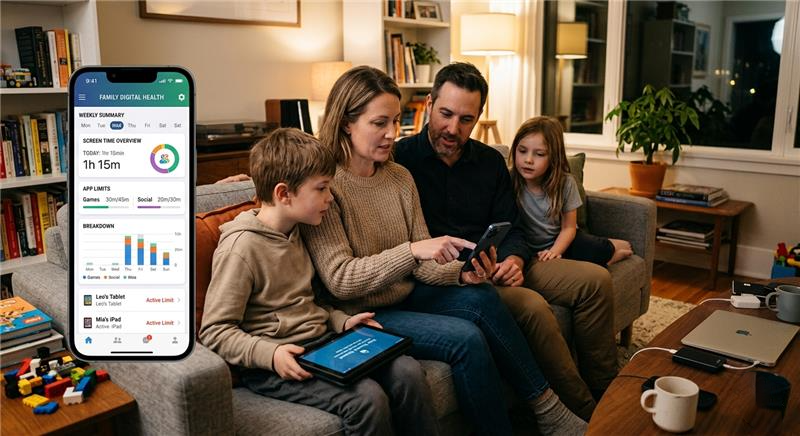
In today’s digital world, smartphones, tablets, and computers are used in almost every part of life. People rely on these devices for study, work, and entertainment. However, without proper control, screen usage can quickly become excessive and affect daily routines.
Screen time monitoring apps for kids & employees are designed to solve this problem. These tools help parents control children’s device usage and help companies manage employee activity to improve focus, productivity, and overall digital balance.
Why Screen Time Monitoring Apps Are Important
The use of screen monitoring apps is increasing because screen addiction is now common in both children and working professionals.
People often spend long hours on mobile apps, social media, and games without realizing how much it impacts their daily routine, health, and productivity.
For Kids:
Children are highly affected by uncontrolled screen usage. It can lead to:
- Poor sleep routine due to late-night screen use
- Reduced focus on studies and homework
- Increased dependency on games and social media
- Less physical activity and outdoor play
For Employees:
In workplaces, excessive screen use also creates problems such as:
- Reduced productivity during working hours
- Frequent distractions from non-work apps
- Poor time management and delays in tasks
- Lack of focus on important responsibilities
These issues clearly show why screen time tracking apps and app usage tracking apps are now necessary in modern life.
How Screen Time Monitoring Apps Work
Most screen time monitoring apps for kids & employees work by tracking device activity in real time and generating simple reports that are easy to understand.
These apps run in the background and collect data about usage patterns to help users control their screen behavior.
Main Functions:
Track Screen Usage
These apps record how much time is spent on each app, website, or device throughout the day.
Monitor App Activity
They show which apps are used most frequently, such as social media, games, or work-related tools.
Set Time Limits
Users can set daily or weekly limits to control excessive usage of specific apps.
Block Apps
Distracting or harmful applications can be blocked during study or working hours.
Generate Reports
Detailed reports are created daily, weekly, or monthly to show usage patterns clearly.
This helps users understand their habits and make better decisions about screen use.
Benefits for Kids
1. Builds Healthy Digital Habits
Screen time control apps help reduce unnecessary screen usage and encourage children to take part in outdoor and offline activities.
2. Improves Study Performance
When screen time is controlled, children focus more on studies, homework, and learning activities instead of entertainment apps.
3. Ensures Online Safety
Device monitoring apps help block unsafe websites, harmful content, and inappropriate applications.
4. Improves Sleep Quality
Limiting screen use, especially before bedtime, helps improve sleep patterns and overall health.
Benefits for Employees
1. Increases Productivity
App usage tracking apps help companies monitor employee activity and reduce unnecessary distractions during working hours.
2. Reduces Distractions
Phone usage tracker apps help block social media and entertainment apps during office hours.
3. Improves Time Management
Employees become more aware of how they spend their working hours and improve efficiency.
4. Enhances Work Discipline
Teams stay focused on tasks, complete work on time, and maintain better performance.
Key Features of Screen Time Monitoring Apps
When selecting screen time monitoring apps for kids & employees, it is important to consider the following features:
Real-Time Tracking
Live monitoring of device activity to show what is happening instantly.
App Blocking
Option to restrict apps that waste time or cause distraction.
Usage Reports
Clear reports showing daily, weekly, and monthly screen usage.
Alerts and Notifications
Warnings when usage exceeds set limits or rules.
Multi-Device Support
Works on smartphones, tablets, laptops, and desktop computers.
Types of Screen Time Monitoring Apps
1. Parental Control Apps
These apps are designed for parents to monitor and manage children’s digital behavior.
2. Employee Monitoring Apps
Used by companies to track productivity and improve workplace performance.
3. Digital Wellbeing Apps
Focused on helping individuals reduce screen addiction and improve personal habits.
Best Practices for Using Monitoring Apps
To get better results from screen monitoring apps, follow these simple practices:
- Set clear rules before using the apps
- Avoid excessive or strict monitoring
- Use reports for improvement, not punishment
- Respect privacy boundaries where necessary
- Encourage offline activities like sports, reading, and outdoor games
Challenges and Concerns
Although screen time monitoring apps for kids & employees are very useful, there are some challenges that should be considered.
Privacy Concerns
Employees may feel uncomfortable if monitoring is too strict or not clearly explained.
Over-Restriction
Too many limits can create frustration, especially for children.
Dependence on Technology
Apps alone cannot solve behavioral issues; communication and understanding are also important.
Future of Screen Time Monitoring Apps
The future of digital wellbeing apps is becoming more advanced with the help of modern technology.
Upcoming Features:
- AI-based behavior analysis
- Smart usage suggestions based on habits
- Predictive reports for better planning
- Integration with wearable devices like smartwatches
These updates will make screen time tracking apps more powerful, accurate, and helpful in daily life.
Top 4 Screen Monitoring Apps Available Online
TheOneSpy
TheOneSpy is a comprehensive monitoring solution designed for parental control and employee supervision across smartphones and computers. It offers a wide range of advanced features that allow users to track digital activities in real time. With its powerful dashboard, users can monitor call logs, text messages, browsing history, social media interactions, and GPS location efficiently. The app also provides live screen recording and screenshot capture, enabling deeper insights into device usage.
One of the standout features of TheOneSpy is its ability to access microphones and cameras remotely, allowing users to listen to their surroundings or capture visuals when necessary. Additionally, it includes keystroke logging, VoIP call recording, and web filtering tools to enhance digital safety.
TheOneSpy is compatible with Android, Windows, and macOS devices, making it a versatile choice for families and businesses. Its cloud-based control panel ensures that all monitored data is accessible from anywhere. The app is particularly useful for parents who want to protect children from online threats and for organizations aiming to improve workforce productivity. Overall, TheOneSpy combines powerful monitoring tools with a user-friendly interface for effective digital supervision.
FonSee
FonSee is a modern parental monitoring application designed to help users track smartphone activities with ease. It provides a variety of tools that allow parents and guardians to oversee digital behavior and ensure online safety. The app includes features such as real-time GPS tracking, screen time management, browsing history monitoring, and detailed activity reports.
FonSee also supports social media monitoring, enabling users to view interactions across popular platforms. It offers screen recording and call tracking features, which help users understand how devices are being used daily. The app operates in the background and delivers data to a secure online dashboard, making monitoring convenient and efficient.
Another notable feature of FonSee is its web filtering and app-blocking capability, which allows users to restrict harmful or inappropriate content. It is compatible with Android devices and does not always require rooting, making installation relatively simple.
Overall, FonSee is a reliable solution for individuals seeking a balance between monitoring and usability. It focuses on providing essential tracking features while maintaining a straightforward interface, making it suitable for parents who want to stay informed about their children’s digital activities.
OgyMogy
OgyMogy is a feature-rich monitoring application developed for parental control and employee tracking across Android and computer devices. It enables users to monitor communication, location, and digital behavior through a centralized dashboard. The app provides access to call logs, text messages, social media chats, browsing history, and app usage patterns.
One of its key strengths is its advanced tracking capabilities, including screen recording, keystroke logging, and real-time GPS tracking. OgyMogy also allows users to capture screenshots, monitor VoIP calls, and listen to their surroundings using microphone access.
The app supports web filtering and geofencing, enabling users to set boundaries and receive alerts when devices enter or leave specific locations. It works on both rooted and non-rooted Android devices and provides regular updates through its online control panel.
OgyMogy is particularly useful for parents who want to ensure their children’s online safety and for businesses that need to monitor employee productivity. With its wide range of features and intuitive interface, it offers a comprehensive solution for responsible and effective digital monitoring.
Guardian Shield
Guardian Shield is a digital monitoring application designed to help users maintain control over device activities for safety and supervision purposes. It is commonly used by parents and organizations to track usage patterns and protect users from potential online risks. The app provides essential monitoring tools such as location tracking, browsing history analysis, and communication monitoring.
With its centralized dashboard, Guardian Shield allows users to review device activity in real time and access detailed reports. It supports monitoring of calls, messages, and internet usage, helping users stay informed about how devices are being used. The app also includes screen monitoring capabilities, which provide visibility into ongoing activities.
Guardian Shield is designed to work across multiple platforms, making it suitable for both mobile devices and computers. Its user-friendly interface ensures that even non-technical users can navigate and utilize its features effectively.
Overall, Guardian Shield focuses on providing practical monitoring tools for safety and awareness. It emphasizes responsible usage, making it a suitable choice for families and organizations looking to maintain digital accountability and ensure a secure online environment.
Conclusion
Managing screen usage is essential in today’s digital lifestyle. Screen time monitoring apps for kids & employees help control device usage, improve focus, and increase productivity.
Parents can protect children from excessive screen time, while companies can improve employee performance. However, the best results come from combining technology with trust, communication, and balanced rules.
Using screen time tracking apps, device monitoring apps, and digital wellbeing apps helps create a healthier digital environment.
FAQs
1. What are screen time monitoring apps for kids & employees?
These are tools that track device usage, monitor app activity, and help control screen time for better habits and productivity.
2. Are screen time tracking apps safe to use?
Yes, they are safe when used responsibly with proper privacy settings and clear guidelines.
3. Can employers legally use phone usage tracker apps?
Yes, but employees must be informed before monitoring starts and legal rules must be followed.
4. What is the difference between digital wellbeing apps and monitoring apps?
Digital wellbeing apps focus on improving habits, while monitoring apps track and control screen usage.
5. What features should I look for in these apps?
Look for real-time tracking, app blocking, usage reports, alerts, and multi-device support.